Overview
The Participant Routing feature allows competition organizers to group participants and associate a compute queue with each group.
When a participant submits a submission, Codabench automatically routes it to the compute queue(s) associated with the participant's groups.
This feature enables organizers to:
- Route different participants to different compute infrastructures (dedicated GPU servers, university clusters, private cloud, etc.).
- Compare the same participant's results across multiple infrastructures.
- Isolate specific participant groups (students, partners, internal teams, etc.) on dedicated compute resources.
- Combine participant routing with multi-task competitions.
Managing Participant Groups
Accessing the Group Management Interface
- Open the competition edit form.
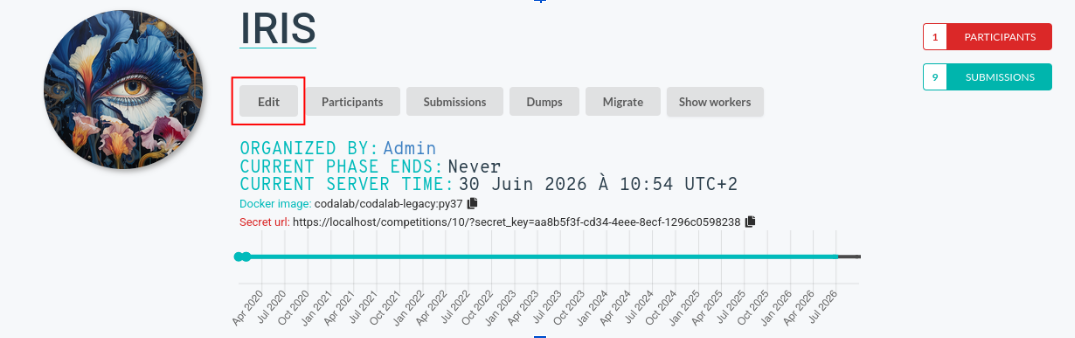
- Navigate to the Participation tab.

- Scroll down to the Participant routing section.

Creating a Group
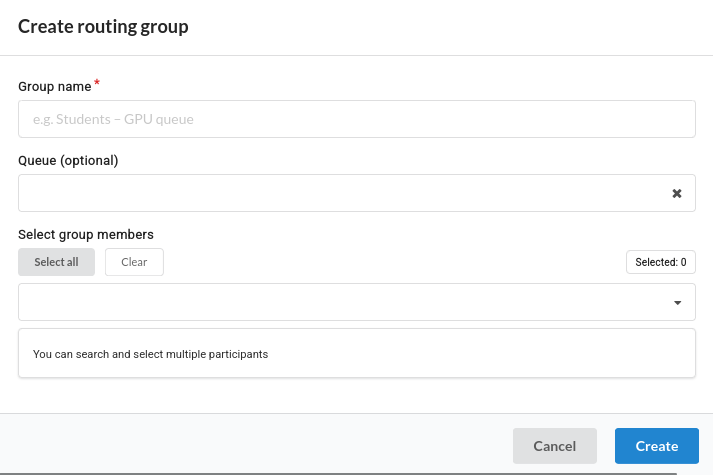
Click New Routing Group.
Fill in the following fields:
| Field | Description |
|---|---|
| Group Name | Display name shown in the leaderboard. Must be unique within the competition. |
| Queue (optional) | Compute queue where submissions from this group will be routed. Use the search field to filter queues. Leave empty to use the competition's default queue. |
| Members | Approved competition participants to include in the group. Search by username or email. |
Click Create.
Deleting a Group
Warning
Deleting a participant group is permanent. Existing submissions are not modified after a group is deleted.
Submission Routing Rules
Queue Priority
Routing follows the following priority:
Tip
title="Queue priority"
Group Queue > Competition Queue > Default Queue
Routing Trigger
Participant routing is enabled only if the participant belongs to at least one group.
Tip
A group without a queue means: Use the competition's default queue.
Queue Deduplication
If multiple groups reference the same compute queue, only one child submission is created. Duplicate submissions are never generated for the same queue.
Group Column
A new Group column appears whenever at least one routed group is involved. It displays the participant group associated with each leaderboard entry. If no routed group is involved, the leaderboard behaves exactly as before and the column is hidden.
Multi-task Competitions
For a given root submission:
- Child submissions executed on the same queue are merged into a single leaderboard row.
- Child submissions executed on different queues appear on separate rows.
Leaderboard exemple
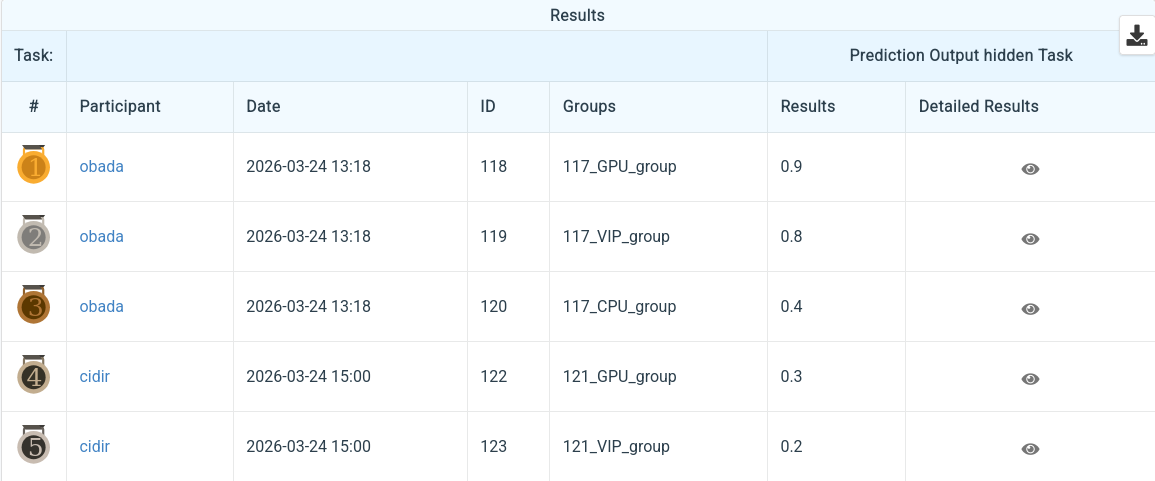
User Obada is inside of three groups (GPU_group, CPU_group and VIP_group), The leaderboard shows three lines, one for each group.
User Cidir is inside of two groups so only two lines are displayed.
Group column shows the group name and the main user submission ID like: ID_GroupName
Routing Scenarios
| Participant configuration | Group queues | Child submissions created | Leaderboard rows | Group column |
|---|---|---|---|---|
| No group, single-task competition | — | 1 root submission executed on Q0 | 1 | ❌ |
| No group, multi-task competition | — | N child submissions on Q0 | 1 | ❌ |
| One group without queue, single-task | Default | 1 root submission on Q0 | 1 | ❌ |
| One group without queue, multi-task | Default | N child submissions on Q0 | 1 | ❌ |
| One group with queue, single-task | Q1 | 1 child submission on Q1 | 1 | ✅ |
| One group with queue, multi-task | Q1 | N child submissions on Q1 | 1 | ✅ |
| One routed group + one default group, single-task | Q1 + Default | 2 child submissions (Q1 + Q0) | 2 | ✅ |
| One routed group + one default group, multi-task | Q1 + Default | 2 × N child submissions | 2 | ✅ |
| Two groups with different queues, single-task | Q1 + Q2 | 2 child submissions | 2 | ✅ |
| Two groups with different queues, multi-task | Q1 + Q2 | 2 × N child submissions | 2 | ✅ |
| Two groups using the same queue | Q1 + Q1 | 1 child submission (deduplicated) | 1 | ✅ |
| K groups with distinct queues | Q1...QK | K × N child submissions | K | ✅ |
Important Notes
Danger
Removing a participant from a group after a submission has been created does not modify existing submissions. If the queue associated with a group is deleted after submissions have been created, the leaderboard displays "—" in the Group column for those entries.
Notes
Re-running a submission recomputes participant routing using the participant's current group memberships.
If group assignments have changed since the original submission, the rerun may produce different child submissions.
Info
Group names are unique within a competition.
Different competitions may use identical group names without conflict.
When participant groups affect routing, the leaderboard adapts automatically.